Word Pizza: Crossword Games
- 4.9
- Rating
- 10.00M
- Installs
- Free
- Price
 Analysis by App-foxy
I found Word Pizza easy to understand within a few minutes, but its real appeal is quieter than the name suggests. This is a free word game from Malpa Games in which I connect letters to complete crossword-style puzzles, moving through a sequence of themed quests at a relaxed pace. It is available in English, rated for Everyone, and works on devices running Android 8.0 or later. The basic idea is simple enough for a short break, yet the later puzzles can still make me stop and reconsider a familiar word.
What interested me most was how much the experience depends on clarity rather than speed. There is no need to learn a complicated control scheme or remember a large set of rules before starting. I can open a puzzle, scan the available letters, and try combinations immediately. That makes it approachable for casual players, people returning to word games after a long break, and anyone who prefers a calm mental exercise instead of a timed challenge.
How clearly the puzzles communicate what to do
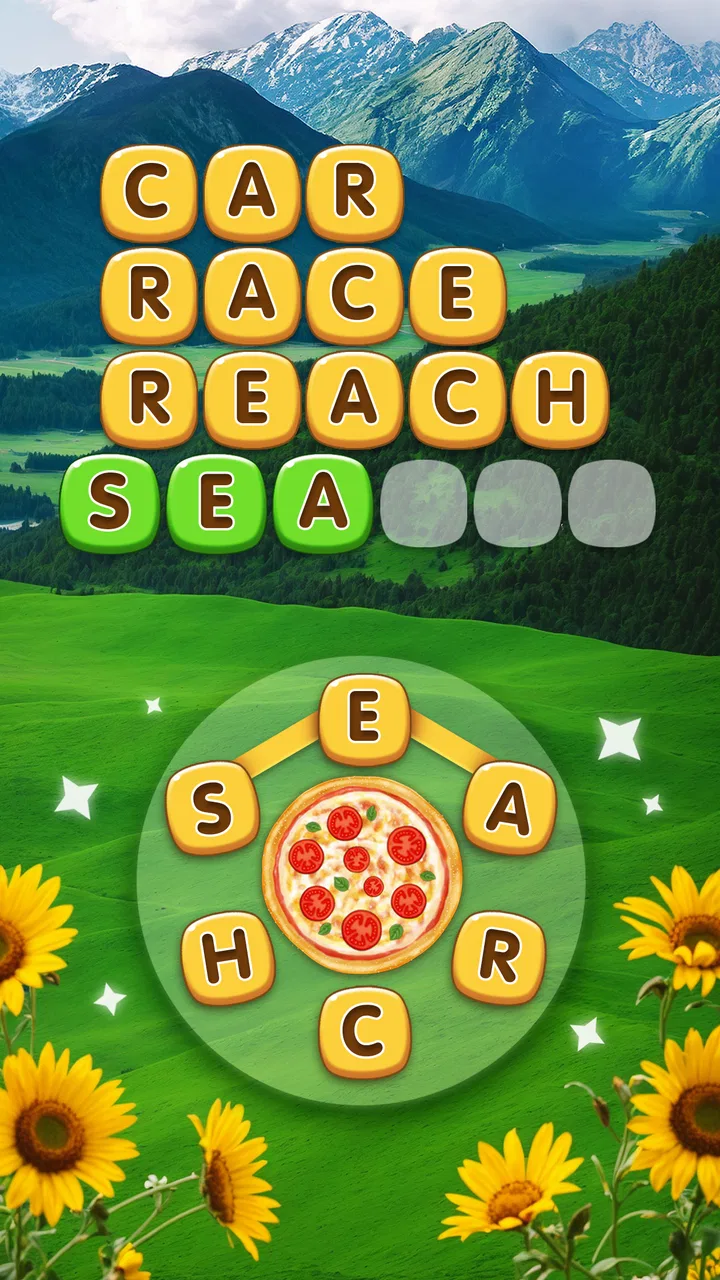
The opening interaction is self-explanatory: letters are placed together to form words, and the completed words fill spaces in a crossword-like layout. I did not need a long tutorial to understand the central action. The visual arrangement also gives me useful feedback because an accepted word changes the puzzle rather than leaving me wondering whether the gesture worked.
You May Also Like

 Blood Strike: 2.5 Anniversary
Blood Strike’s Loadouts Turn Every Drop Into a Tactical Gamble
A close look at Blood Strike’s custom loadouts: how fast access to signature weapons reshapes its battle royale rhythm, rewards preparation, and narrows the gap between fights.

 Pandora - Music & Podcasts
Pandora’s Music Is Easy to Start, but Harder to Recover
Pandora’s strength is its low-effort path from a seed to a station. Its weak spot is how much confidence it asks you to place in connection, setup, and quiet recovery.

 8 Ball Pool
 Is Built on Rivalries, Rematches, and Routine
A close look at the rivalries, rematches, shared routines, and unanswered safety questions that turn a quick pool match into a persistent mobile community.

 Samsung Music
’s Quiet Strength Is Playing What You Already Own
Its reach comes less from spectacle than from dependable access to a personal library. That simplicity is both the app’s strongest retention engine and its ceiling.

 AccuWeather: Weather Radar
AccuWeather Review: A Quick, Clear Forecast for Everyday Decisions
For everyday plans, the best forecast is the one you can understand quickly. AccuWeather makes rain timing, radar, and local conditions easy to act on, with a few trade-offs.

 Hill Climb Racing
Why Hill Climb Racing Still Turns Crashes Into One More Run
A tiny car, a bumpy hill and one more upgrade: Hill Climb Racing keeps resurfacing because its simple chaos makes every near-miss feel personal.
More From Our News Desk
View All News


That straightforward design matters for readability. A player who is not comfortable with dense menus can focus on the board itself. The game presents one small problem at a time, which is less intimidating than a large word bank or a traditional crossword page packed with clues. I also appreciate that the English presentation keeps the experience focused on vocabulary rather than asking me to interpret complicated instructions.
The main navigation is suitable for brief sessions. I can play a puzzle, make progress, and stop without having to build a long strategy around the game. This works especially well when I have only a few minutes on public transport, while waiting for an appointment, or during a quiet pause at home. The structure encourages picking up the phone and starting where I left off instead of treating every session as a major commitment.
Still, simple navigation does not mean every puzzle is equally transparent. When several possible words can be made from the same letters, I sometimes spend more time testing combinations than solving a clue. That ambiguity is part of the challenge, but it can also feel less satisfying for players who prefer precise definitions and a clearly signposted answer. Traditional crossword apps may be a better fit if you want explicit clues, a fixed grid, and a stronger sense of editorial control.
Reading comfort and mental load
The game’s small-scale puzzle format keeps the amount of information on screen manageable. I am usually dealing with a limited group of letters and a compact target rather than a page of competing panels. For players who become tired when an interface is crowded, that restraint is helpful. It also makes the game suitable for a quick mental warm-up before work or a low-pressure activity at the end of the day.
There is a useful distinction between visual simplicity and effortless solving. The board may be easy to read, but finding the intended word can still require flexible thinking. I often begin with the most obvious short words, then use the remaining spaces to work backward. That habit is more effective than trying to guess the longest answer immediately, especially when the available letters can be rearranged in several plausible ways.
My practical advice is to treat each puzzle as a process of elimination. First, look for familiar short words. Next, notice which letters remain unused and whether the empty spaces suggest a particular length. Finally, try less common combinations without assuming that the first recognizable word is the right one. This approach reduces visual and mental clutter because I am not repeatedly scanning every possible arrangement at random.
The game is also a reasonable choice for players who want English word practice without turning the experience into a formal lesson. I would not describe it as a language course, but connecting letters can encourage attention to spelling and word patterns. Someone learning English should remember that success may depend on vocabulary familiarity, so the relaxed presentation does not remove the difficulty of working in a second language.
Controls, pace, and different ways of playing
The central gesture is uncomplicated, which helps players who do not want multiple control methods to memorize. I can concentrate on moving through the letter sequence instead of managing a character, timing jumps, or coordinating several buttons. That makes the game less demanding than action titles for people who find fast touch controls tiring or frustrating.
At the same time, any letter-connecting game relies on accurate touch input. A player with limited finger control, hand tremors, or difficulty making a continuous gesture may find the basic action less comfortable than someone who can swipe precisely. I would test a few puzzles before committing to long sessions. The calm pace helps, but it does not change the physical nature of the main interaction.
For players who prefer minimal movement, the game can work well in short bursts with the phone held steadily on a table or supported in one hand. I find that a stable position makes it easier to inspect the letter arrangement and reduces accidental touches. This is a small practical adjustment, but it makes a noticeable difference when I am tired or playing in a moving vehicle.
People who need spoken instructions, strong tactile feedback, or a fully keyboard-based experience should be more cautious. I would not choose this title on the assumption that a word puzzle automatically accommodates every input preference. Its accessible quality comes mainly from the uncomplicated concept and gentle pace, not from specialized controls that would suit every physical or sensory need.
How it fits different situations and abilities
The strongest accessibility feature is the low pressure of the session structure. I can stop after a single puzzle without feeling that I have abandoned a team, missed a live event, or wasted a carefully prepared run. That makes Word Pizza useful for people whose attention comes and goes, including anyone playing between household tasks or during recovery time when sustained concentration is difficult.
It also suits mixed-age households because the content rating is Everyone and the rules are easy to explain. I can imagine handing the phone to a relative who does not normally play games and watching them understand the goal without a lengthy demonstration. However, the vocabulary level may still separate players by age, education, or English experience. A simple interface is welcoming; it does not guarantee that every word will feel familiar.
For someone who wants a quiet alternative to scrolling, this is one of the better use cases. I might play a few rounds while waiting for a coffee, then close the game without losing the benefit of having done something mentally active. The lack of reflex-heavy action also makes it more suitable than arcade games when I am in a low-energy mood or sharing a quiet room.
Situational access can change the experience. In bright outdoor light, small letter details may be harder to inspect, while glare on the screen can make any touch puzzle more annoying. On a crowded bus, repeated swiping may be less comfortable than tapping through a conventional word game. At night, the concentration required to distinguish similar arrangements can feel more tiring than expected, even though the game itself is not fast.
Players who need constant stimulation may find the relaxed format too restrained. There is no appeal here for someone looking primarily for animated action, competitive pressure, or a social match. Likewise, dedicated crossword fans may miss clue writing and the satisfaction of solving a carefully constructed newspaper-style grid. I see this as a lighter entry point into word puzzles, not a replacement for every other format.
Helpful habits for smoother play
I get more from the game when I avoid treating every board as a test of immediate recall. If I pause and look at the empty spaces, the layout often narrows the possibilities. I also try not to overuse guesses when I am mentally tired; taking a short break is usually more productive than dragging the same letters around repeatedly.
Another useful habit is to play with a consistent screen position. Keeping the phone flat or supported reduces the need to grip it tightly, which can help during longer sessions. I also prefer playing in a quiet setting when I am working through an unfamiliar vocabulary set. Background conversation does not make the controls harder, but it makes it easier for me to overlook a simple word.
Because the game is free to install, it is easy to try without making an immediate financial commitment. It does include in-app purchases ranging from $0.49 to $99.99 per item, so I would recommend checking the purchase flow before allowing a child to play or handing over an unlocked device. The free entry is convenient, but families should still treat optional spending as part of the decision rather than assuming every part of the experience is cost-free.
The current version is 4.51.22, and the title has been available since October 31, 2017. Those details help explain why it feels like an established casual game rather than a brand-new experiment. Its audience is substantial, with over ten million installs, an average rating of 4.8 from around 472 thousand ratings, and roughly 3.5 thousand written reviews. I read those figures as evidence of broad interest, not as proof that every player will find the vocabulary or touch interaction comfortable.
Where other word games may serve you better
Compared with a standard crossword app, this game asks less from the player at the beginning. I do not need to interpret a clue before I can act; the letters give me an immediate starting point. That makes it friendlier for casual play and for people who feel blocked by cryptic or highly literary clues. The trade-off is that the solving process can feel less precise, because the available letters rather than a detailed clue guide my decisions.
Compared with word-search games, the experience feels more constructive. I am not simply scanning a fixed block for hidden terms; I am building answers from the letters offered. That creates more mental flexibility, but it can also produce moments where several options appear reasonable. Players who enjoy visual hunting may prefer a word-search format, while players who like rearranging letters will probably find this more engaging.
Compared with competitive word games, the relaxed design is easier on attention and reaction speed. I do not have to race another person or worry about making a move before a countdown expires. That is a meaningful advantage for people who dislike pressure. On the other hand, anyone motivated by rankings, direct opponents, or a strong sense of mastery may find the solo puzzle rhythm too gentle.
Compared with a dedicated language-learning app, Word Pizza is more entertaining than instructional. It can reinforce spelling awareness and expose me to English word patterns, but it does not replace lessons, explanations, or structured vocabulary review. I would use it as a casual supplement, especially when I want practice that feels like play, not as my main tool for building language proficiency.
Barriers that remain easy to overlook
The biggest barrier is not the rules; it is the combination of vocabulary and touch accuracy. A player may understand exactly what to do and still struggle because the expected word is unfamiliar or because the gesture does not register as intended. That distinction matters when recommending the game to someone who has difficulty with reading, spelling, fine motor control, or English vocabulary.
Another limitation is that “relaxing” does not mean universally calming. Repeatedly trying combinations without a clear clue can become irritating, especially for players who need a definite explanation when an answer is rejected. I would choose a clue-driven crossword for anyone who enjoys learning why an answer fits. Here, the satisfaction comes more from discovering the pattern than from receiving a detailed justification.
Screen context matters too. A phone with a small display may make letter inspection less comfortable for someone with reduced vision, while a large display can make the board easier to examine. I would not make assumptions based only on the game’s simple appearance. The best test is a short session on the actual device the intended player will use, in the lighting and posture they normally have.
Families should also consider the purchase range before treating the game as a child-friendly distraction. The Everyone rating describes the content suitability, while optional purchases concern spending habits. Those are separate questions. I would enable the device’s purchase safeguards and explain that free installation does not necessarily mean every optional item is free.
My inclusive verdict
I recommend Word Pizza to anyone who wants an approachable English word game with a gentle pace and little setup. It is particularly good for short, independent sessions, casual vocabulary practice, and players who prefer forming words over racing through a level. The simple board and familiar objective make it less intimidating than many traditional crossword formats, while the growing challenge gives it enough substance to remain useful after the first few plays.
I would be more selective for players who need alternative input methods, spoken guidance, highly adjustable visual presentation, or detailed clues for every answer. The game’s strengths are its straightforward concept and low-pressure rhythm, not specialized support for every ability. A conventional crossword, a word-search title, or a structured language app may be the better choice depending on whether the priority is clue precision, visual scanning, or formal learning.
For me, the best way to use it is as a small daily reset: open a puzzle, work through the letters without rushing, and stop when my attention starts to fade. The free price makes that trial easy, although the optional purchase range deserves attention on shared or child-used devices. With those qualifications in mind, Word Pizza is a welcoming word-puzzle choice when you value calm problem-solving more than competition or elaborate features.
FAQs for Word Pizza: Crossword Games
01What is Word Pizza - Puzzle Games?
Word Pizza - Puzzle Games is an engaging word puzzle game where players form words using letters arranged in a pizza-like circle. It's designed to challenge your vocabulary and problem-solving skills while providing endless fun. The game is available on both Android and iOS platforms, offering a simple yet addictive gameplay experience.
02How do I play Word Pizza - Puzzle Games?
To play Word Pizza, you simply swipe over the letters on the screen to form words. Each level presents a different set of letters and themes, making each puzzle unique. As you progress, the puzzles become more challenging, requiring strategic thinking and a good vocabulary to complete them successfully.
03Is Word Pizza - Puzzle Games free to play?
Yes, Word Pizza - Puzzle Games is free to download and play. However, it offers in-app purchases for players who wish to enhance their gameplay experience, such as purchasing hints or removing ads. These purchases are optional and not necessary to enjoy the game fully.
04Does Word Pizza - Puzzle Games require an internet connection?
Word Pizza can be played offline, making it perfect for those times when you don't have access to the internet. However, certain features, like in-app purchases and leaderboard updates, do require an internet connection. Playing offline won't affect your ability to enjoy the main game.
05Are there any age restrictions for playing Word Pizza - Puzzle Games?
Word Pizza - Puzzle Games is suitable for players of all ages. Its simple interface and educational value make it a great option for both children and adults. Parents can feel confident that the game offers a safe and entertaining environment for young players to improve their vocabulary skills.
Pros
- Engaging word puzzles to stimulate your mind.
- Colorful graphics enhance the gaming experience.
- Easy to play
- suitable for all age groups.
- Offline mode available for uninterrupted play.
- Regular updates with new levels and challenges.
Cons
- Contains ads that can disrupt gameplay.
- In-app purchases may be necessary for hints.
- Limited language options for non-English speakers.
- Repetitive levels may become monotonous.
- Requires internet for certain features.

Word Pizza: Crossword Games
Gallery